
Exciting news! TCMS official website is live! Offering full-stack software services including enterprise-level custom R&D, App and mini-program development, multi-system integration, AI, blockchain, and embedded development, empowering digital-intelligent transformation across industries. Visit dev.tekin.cn to discuss cooperation!
Addressing key pain points in Python development on macOS, this article presents a complete manual compilation and installation solution for Python 3.11.9. Leveraging MacPorts for dependency management, it deeply integrates Tkinter GUI support, Readline terminal interaction enhancements, and OpenSSL secure communication modules—while fully compatible with the pyenv version manager.
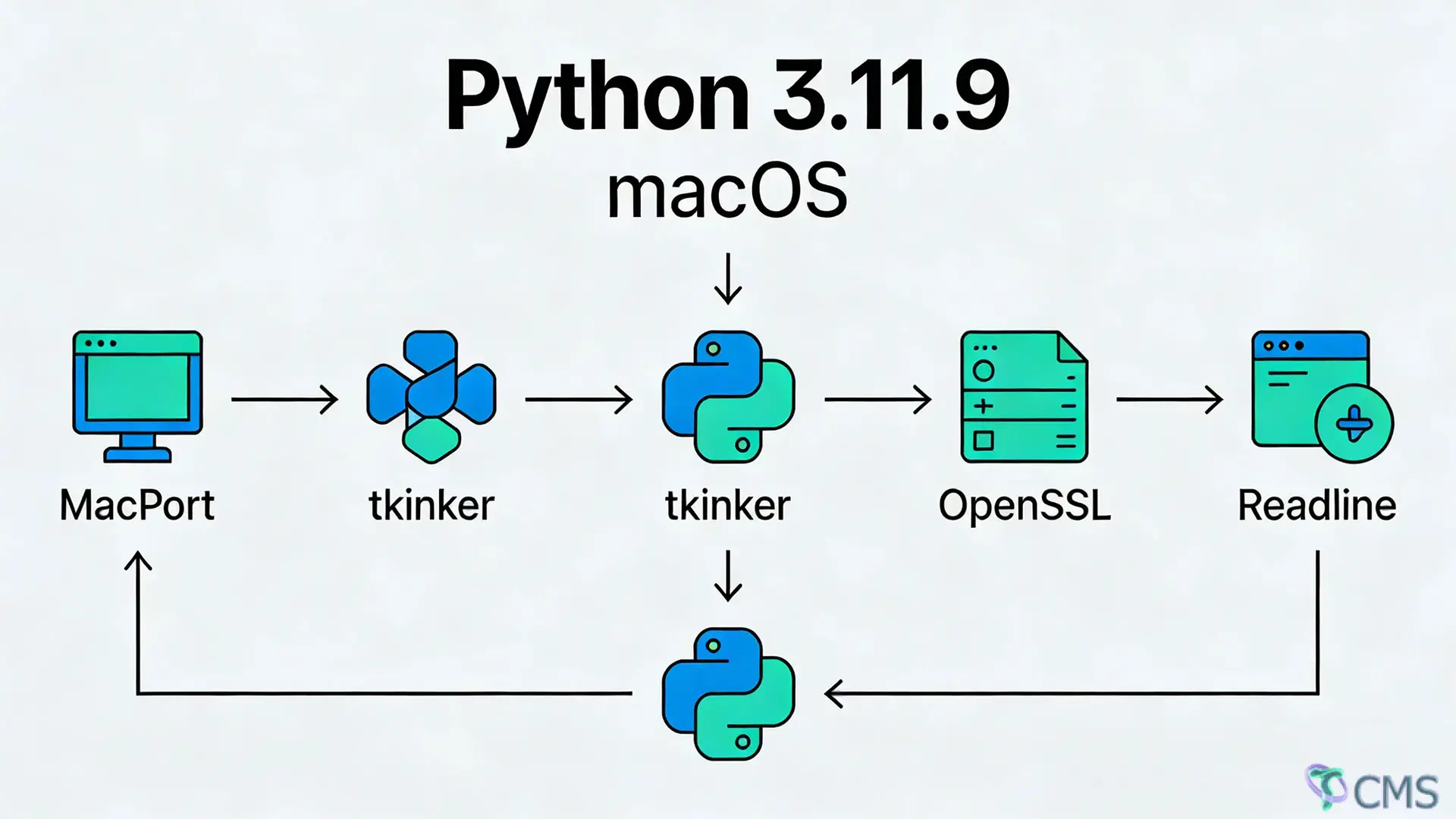
Addressing key pain points in Python development on macOS, this article presents a complete manual compilation and installation solution for Python 3.11.9. Leveraging MacPorts for dependency management, it deeply integrates Tkinter GUI support, Readline terminal interaction enhancements, and OpenSSL secure communication modules—while fully compatible with the pyenv version manager. Covering the entire workflow from dependency installation, environment variable configuration, and source code compilation to functionality verification, this guide includes a detailed troubleshooting manual. It resolves common issues such as outdated system Python versions, incomplete features from automatic installations, and path conflicts, making it suitable for both development and production environments. Even beginners can successfully set up a fully functional Python environment in one go.
✅ One-stop solution for Tkinter launch failures, GUI rendering glitches, and Chinese garbled text
✅ Integrated OpenSSL 3.x ensures smooth operation of pip/requestsand other network-related functions
✅ Compiled Readline enables core terminal interactions (command history navigation, tab completion, etc.)
✅ Seamless compatibility with pyenv for global/local version switching
✅ Works with both MacPorts and Brew package managers to resolve cross-tool path conflicts
✅ Comprehensive verification process + troubleshooting guide for first-time success, even for beginners
System: macOS 10.15+ (Catalina/Monterey/Ventura/Sonoma), compatible with both Intel and Apple Silicon chips
Prerequisite Tools: MacPorts and pyenv installed (quick deployment references available at the end if missing)
Core Dependencies: tcl/tk, tkimg, readline-8.2, openssl@3 (full installation covered in this guide)
Dependency missing is the primary challenge in Python compilation. Install underlying libraries via MacPorts first to avoid subsequent errors:
# Core: Install Tcl/Tk suite (Tkinter GUI dependency) + tkimg image support library
sudoport install tcl tk tkimg
# [Optional Optimization] Fix X11 window blurriness and Chinese display issues (skip if no GUI needs)
sudoport install xorg-server✅ Critical Note: Tcl/Tk installed via MacPorts is uniformly located at /opt/local/lib, offering far better compatibility than Brew. This completely resolves issues like missing Tkinter libraries or version mismatches.
Unify linker paths, header file paths, and encoding formats before compilation to prevent failures caused by messy system/package manager paths. Use ~/.bash_profile(replace with ~/.zshrcfor zsh users) as the configuration file.
# Open the configuration file (creates automatically if it doesn't exist)
vim~/.bash_profile⚠️ Important: If the file already contains configurations like LDFLAGS/CPPFLAGS/PKG_CONFIG_PATH, do NOT delete existing content. Append the following to the end of the file (paths will merge automatically without conflicts):
# ========== Python 3.11.9 Compilation Exclusive Configuration - Start ==========
# 1. Merge linker paths (covers MariaDB + Tcl-Tk + OpenSSL + MacPorts)
export LDFLAGS="-L/opt/local/lib/mariadb-10.11/mysql -L/usr/local/opt/tcl-tk/lib -L/usr/local/opt/openssl@3/lib -L/opt/local/lib"
# 2. Merge header file paths (corresponding to all dependency header directories)
export CPPFLAGS="-I/opt/local/include/mariadb-10.11/mysql -I/usr/local/opt/tcl-tk/include -I/usr/local/opt/openssl@3/include -I/opt/local/include"
# 3. Configure pkg-config path (allows compiler to automatically detect dependency libraries)
export PKG_CONFIG_PATH="/opt/local/lib/pkgconfig:/opt/local/lib/mariadb-10.11/pkgconfig:/usr/local/opt/tcl-tk/lib/pkgconfig:/usr/local/opt/openssl@3/lib/pkgconfig"
# 4. Tkinter GUI display configuration (resolves X11 window launch failures)
export DISPLAY=":0.0"
# 5. Global encoding configuration (completely fixes Chinese garbled text and input issues)
export LC_ALL=en_US.UTF-8
export LANG=en_US.UTF-8
# 6. pyenv priority configuration (Critical! Ensures pyenv-managed Python takes precedence)
export PATH="${HOME}/.pyenv/shims:${PATH}"
# ========== Python 3.11.9 Compilation Exclusive Configuration - End ==========# Refresh environment variables (bash terminal)
source~/.bash_profile
# For zsh terminal users (choose one)
source~/.zshrcCore terminal interactions in Python (command history navigation, tab completion, cursor movement) depend on the Readline library. The system's built-in version lacks full functionality, so manually compile and install the latest version (8.2) to the pyenv target version directory for precise recognition during Python compilation.
# Download source code (stable version from official website; alternatively, download manually and upload to server)
wgethttps://ftp.gnu.org/gnu/readline/readline-8.2.tar.gz
# Extract the source package
tar -zxvfreadline-8.2.tar.gz
cdreadline-8.2# Configure compilation parameters: specify installation path + support for both static/dynamic libraries
./configure \
--prefix=${HOME}/.pyenv/versions/3.11.9 \
--enable-static\
--enable-shared
# Multi-core compilation (-j4 for 4-core CPUs; use -j8 for M-series chips to speed up)
make -j4
# Install to pyenv 3.11.9 directory
makeinstall✅ Result: Installation succeeds if no errors occur. Readline header files will be stored in the includedirectory, and library files in the libdirectory—ready for direct use during Python compilation.
# Download official source package (xz format: smaller size, higher integrity)
wgethttps://www.python.org/ftp/python/3.11.9/Python-3.11.9.tar.xz
# Extract the source code (-J for xz format, -v to show extraction progress)
tar -JvxfPython-3.11.9.tar.xz
cdPython-3.11.9Execute the complete configuration command below, which integrates all core functions, path adaptations, and dependency associations—key to successful compilation. Copy and run directly:
⚠️ Path Replacement Notes:
If OpenSSL was installed via MacPorts: Replace --with-openssl=/usr/local/opt/openssl@3with --with-openssl=/opt/local/libexec/openssl3
If using Brew: Use a variable for automatic path adaptation: --with-openssl=$(brew --prefix openssl@3)
# Core configuration command (integrates Tk + Readline + OpenSSL + MacPorts + pyenv)
./configure \
 --prefix=${HOME}/.pyenv/versions/3.11.9 \
 --enable-shared\
 --with-readline\
 --enable-optimizations\
 --with-openssl=/usr/local/opt/openssl@3 \
 CPPFLAGS="-I${HOME}/.pyenv/versions/3.11.9/include -I/opt/local/include -I/usr/local/opt/openssl@3/include"\
LDFLAGS="-L${HOME}/.pyenv/versions/3.11.9/lib -L/opt/local/lib -L/usr/local/opt/openssl@3/lib -ltcl8.6 -ltk8.6"--prefix: Specifies the installation path, bound to the pyenv version directory for unified version management
--enable-shared: Compiles dynamic link libraries to reduce size and support extension library calls
--with-readline: Associates the manually installed Readline library to enable terminal interaction enhancements
--enable-optimizations: Enables compilation optimizations to improve Python runtime speed (slightly time-consuming, optional)
--with-openssl: Specifies the OpenSSL path to resolve the ssl module is not availableerror
CPPFLAGS: Specifies header file paths for all dependencies, ensuring the compiler finds Tcl/Tk/OpenSSL/Readline
LDFLAGS: Specifies library file paths for all dependencies, manually linking Tcl8.6/Tk8.6 core libraries
# Multi-core compilation (adjust -j parameter based on CPU cores; recommended: -j4/-j8)
make -j4
# Formal installation to the specified path
makeinstall✅ Compilation Success Mark: No errormessages in the terminal, and final output of Successfully installed pip-xxx setuptools-xxxindicates completion.
After Python compilation, refresh pyenv configuration to ensure the system prioritizes the compiled version—avoiding conflicts with the system's built-in Python or other pyenv versions.
# Refresh pyenv version mapping to recognize the newly compiled 3.11.9
pyenv rehash# Reset global version first, then set 3.11.9 as the default global version
pyenv global system
pyenv global 3.11.9
# Refresh terminal environment immediately to activate version switching (no terminal restart required)
exec $SHELL -lAfter compilation, verify the version, core modules, and extension libraries one by one to avoid issues in subsequent development. All verification commands should run without errors for success.
# Check the current pyenv-bound version
pyenv version
# Check the actual execution path + version of python/python3
which python && python --version
which python3 && python3 --version✅ Expected Results:
pyenv versionoutputs 3.11.9 (set by /Users/xxx/.pyenv/version)
which pythonoutputs ~/.pyenv/shims/python(pyenv has the highest priority)
❌ Troubleshooting: If the first line of which pythonis not the pyenv path, priority has failed. Re-run source ~/.bash_profileto ensure the PATHconfiguration takes effect.
Tkinter is Python's built-in GUI library and the most error-prone module during compilation. Verify with the following command:
# Launch Tkinter test window; success if a GUI window appears
python3 -c "import tkinter; tkinter._test()"
✅ Expected Result: A test window titled tkpops up with buttons, input boxes, etc.—no errors, no Chinese garbled text, and normal window rendering.
❌ Troubleshooting: If encountering ModuleNotFoundError: No module named '_tkinter', Tcl/Tk libraries were not linked during compilation. Re-run sudo port install tcl tk tkimg(Step I) and recompile Python.
# Check if the ssl module is available
python3 -c "import ssl; print(ssl.OPENSSL_VERSION)"
✅ Expected Result: Outputs OpenSSL version information (e.g., OpenSSL 3.5.4 30 Sep 2025) without errors.
# Enter Python terminal to test interaction functions
python3
✅ Expected Result: In the terminal, you can navigate command history with ↑/↓, tab-complete code, and clear lines with Ctrl+U—no lag or errors.
For the convenience of pyenv automatic installation, inject the core compilation parameters from this article into pyenv to achieve "automatic installation + full-feature integration"—equivalent to manual compilation, ideal for quick deployment:
# Inject compilation parameters and install Python 3.11.9 with one command
PYTHON_CONFIGURE_OPTS="--enable-shared --with-readline --enable-optimizations --with-openssl=/usr/local/opt/openssl@3 CPPFLAGS='-I/opt/local/include' LDFLAGS='-L/opt/local/lib -ltcl8.6 -ltk8.6'"\
pyenv install 3.11.9
# Subsequent calibration steps are the same as manual compilation
pyenv rehash
pyenv global 3.11.9
exec $SHELL -l✅ Issue 1: Error ssl module is not availablewhen running python3 -m pip install xxx
Cause: Incorrect OpenSSL path configuration; SSL library not linked during compilation
Solution: Re-specify the --with-opensslpath (use /opt/local/libexec/openssl3for MacPorts, $(brew --prefix openssl@3)for Brew) and recompile Python.
✅ Issue 2: Tkinter test command errors with _tkinter.TclError: no display name and no $DISPLAY environment variable
Cause: DISPLAYenvironment variable not configured; X11 window cannot render
Solution: Run export DISPLAY=":0.0"or configure the variable permanently in ~/.bash_profile.
✅ Issue 3: Python version switch fails; which pythonpoints to the system path
Cause: pyenv's shimsdirectory has lower priority than the system path
Solution: Add export PATH="${HOME}/.pyenv/shims:${PATH}"to the configuration file and run source ~/.bash_profileto activate.
✅ Issue 4: Compilation error fatal error: tcl.h: No such file or directory
Cause: Tcl/Tk header files not found; incomplete dependency installation
Solution: Re-run sudo port install tcl tk tkimgto ensure header files are stored in /opt/local/include.
✅ Issue 5: Python terminal lacks command history navigation and tab completion
Cause: Readline library not linked successfully
Solution: Recompile Readline and ensure the --with-readlineparameter takes effect in the configure step.
This manual compilation solution is the ultimate guide for Python 3.11.9 on macOS. It resolves feature limitations of the system's built-in Python and dependency gaps in pyenv automatic installations, fully integrating Tkinter, Readline, and OpenSSL core modules while seamlessly adapting to the MacPorts/pyenv ecosystem.
Whether for development environment setup, production deployment, or resolving compilation errors, the steps in this article are directly reusable. Following the workflow ensures a successful one-time compilation, delivering a fully functional and stable Python environment.
TAGS: macOS, Python 3.11.9, Manual Python Compilation, Tkinter Installation, OpenSSL, Readline, MacPorts, pyenv, Python Environment Setup, macOS Python Troubleshooting, Python Dependency Installation, Development Environment Configuration

 Tekin Tian
May 03, 2025

 Tekin Tian
May 03, 2025



Please enter your email address below and click the subscribe button. By doing so, you agree to our Terms and Conditions.